Google Translate Chrome Extension – Download, Install & Use in Chrome
The Google Translate Chrome Extension makes it easy to translate websites, highlighted text, and online content directly within your browser. Whether you’re reading foreign-language articles, researching international topics, or communicating across languages, this extension helps remove language barriers with just a few clicks. Millions of users rely on Google’s translation technology to browse the web more efficiently and understand content from around the world.
What Is Google Translate?
Google Translate is a free language translation service developed by Google that supports hundreds of languages. Its browser extension integrates directly with Chrome, allowing users to translate content without leaving the page they are viewing.
The extension provides instant translations for selected text and complete web pages, making it a useful tool for students, professionals, travelers, and everyday internet users.
Key Features and Benefits
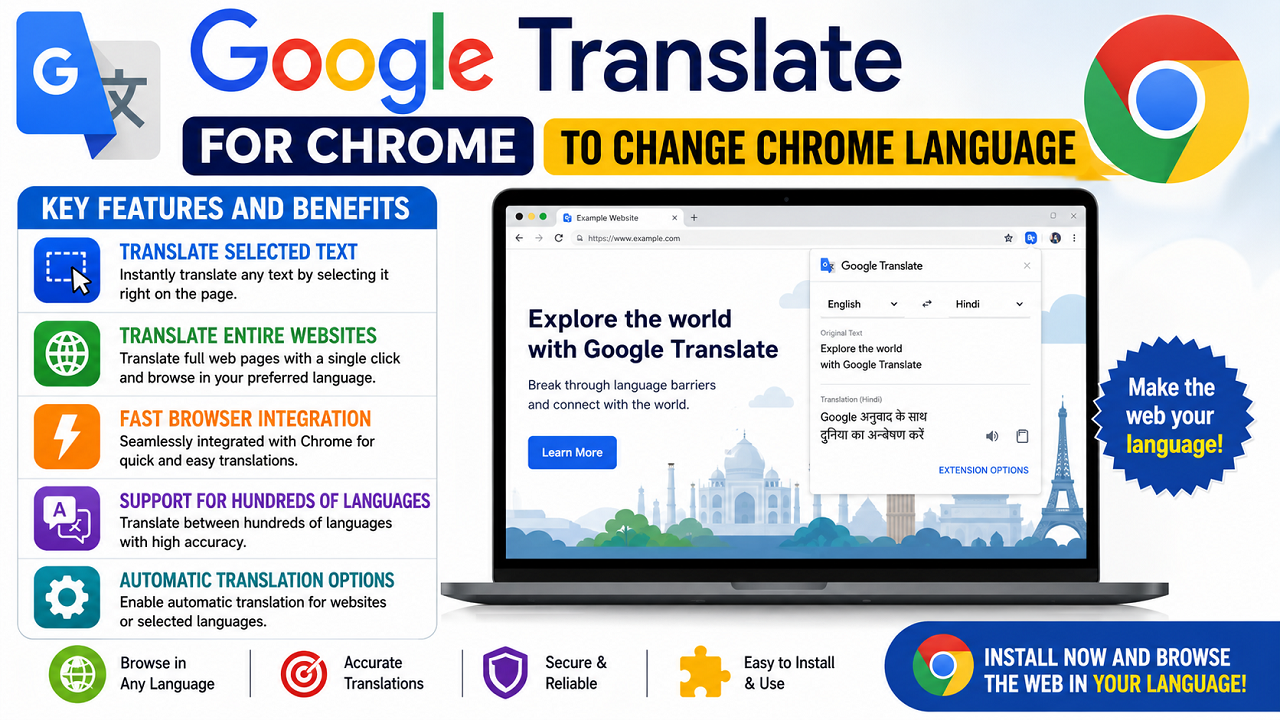
Translate Selected Text
Users can highlight any word, sentence, or paragraph on a webpage and receive an instant translation. This feature is especially useful when reading articles, documents, or websites in unfamiliar languages.
Translate Entire Websites
Instead of translating content piece by piece, users can convert an entire webpage into their preferred language with a single click.
Fast Browser Integration
Once installed, the translation icon appears in the Chrome toolbar, giving users quick access whenever they need assistance understanding foreign-language content.
Support for Hundreds of Languages
Google’s translation technology supports a wide range of global languages, helping users access information from different countries and cultures.
Automatic Translation Options
Users can configure settings to display translations automatically when text is selected or when visiting websites written in another language.
How to Install Google Translate Chrome Extension
Installing the Google Translate Chrome Extension is simple and only takes a few minutes.
Step 1: Open the Chrome Web Store
Launch Google Chrome and visit the Chrome Web Store.
Step 2: Search for the Extension
Enter “Google Translate” in the search bar and locate the official extension published by Google.
Step 3: Add It to Chrome
Click the “Add to Chrome” button and confirm the installation when prompted.
Step 4: Start Using the Extension
After installation, the translation icon will appear in your browser toolbar, allowing immediate access to translation features.
Using the Extension for Everyday Browsing
The extension offers multiple ways to translate content while browsing.
Translate Highlighted Content
- Select the text you want to translate.
- Right-click the selected content.
- Choose the translation option.
- View the translated text instantly.
Translate an Entire Page
- Open a webpage written in another language.
- Click the translation icon in the browser toolbar.
- Choose the option to translate the page.
- Read the translated version in your preferred language.
Google Translate Extension Download Guide
When looking for a Google Translate extension download, it is always recommended to use official sources. Installing browser extensions from trusted platforms helps ensure security, reliability, and access to the latest updates.
Users should avoid downloading modified versions from unknown websites, as these may contain outdated files or security risks.
Why Chrome Users Choose This Translation Tool
This Chrome translation extension remains one of the most popular browser tools because of its simplicity and convenience.
Some of the main reasons users choose it include:
- Instant translations
- Easy setup process
- Support for numerous languages
- Full webpage translation
- Free access to Google’s translation technology
These features make it a practical solution for anyone who regularly encounters multilingual content online.
The Google Translate Chrome Extension is a valuable tool for anyone who wants to browse the web without language limitations. From translating individual words to converting entire websites, it provides a fast and user-friendly experience directly inside Chrome.
Whether you need quick translations for work, study, research, or travel, the Google Translate Chrome Extension offers a convenient way to understand content from around the world. If you’re searching for a reliable Google Translate extension download, the official Chrome Web Store remains the safest place to install and use it.